Music Downloader & Mp3 Player
- 3.9
- Rating
- 5.00M
- Installs
- Free
- Price

 Analysis by App-foxy
I approached Music Downloader & Mp3 Player as the kind of app that could either become a useful offline music drawer or disappear after a few curious searches. Its promise is straightforward: find music, download it, and play it from one place. That sounds simple, but the real test is what happens after the first week, when the novelty of searching has worn off and the app has to fit naturally into everyday listening.
This is a free Android app in the Music & Audio category, developed by Video Downloader & Player AppTool. It has a 3.9 average from around 36 thousand ratings and has passed 5 million installs, so it is clearly reaching a large audience even though the experience is not universally loved. The current release is v10-110226, it works on Android 7.0 and later, and its Teen content rating is worth keeping in mind for younger users and families.
What the first week feels like
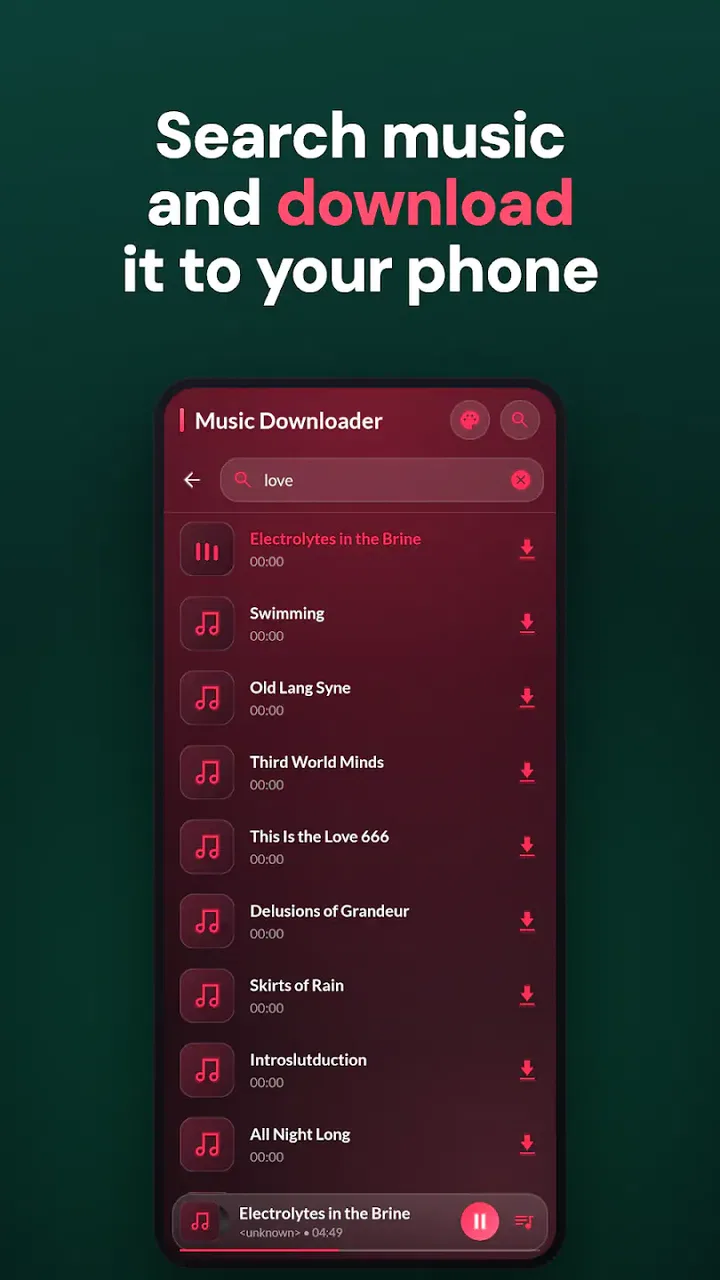
The initial appeal is easy to understand. I can open the app with a specific song in mind, search for it, and then move toward downloading or playing it without jumping between a separate search tool, a file manager, and a music player. That compact workflow is the strongest reason to try it. If I regularly prepare music before commuting, traveling, or spending time somewhere with unreliable connectivity, having discovery and playback together feels more convenient than managing several unrelated apps.
You May Also Like

 Blood Strike: 2.5 Anniversary
Blood Strike’s Loadouts Turn Every Drop Into a Tactical Gamble
A close look at Blood Strike’s custom loadouts: how fast access to signature weapons reshapes its battle royale rhythm, rewards preparation, and narrows the gap between fights.

 Pandora - Music & Podcasts
Pandora’s Music Is Easy to Start, but Harder to Recover
Pandora’s strength is its low-effort path from a seed to a station. Its weak spot is how much confidence it asks you to place in connection, setup, and quiet recovery.

 8 Ball Pool
 Is Built on Rivalries, Rematches, and Routine
A close look at the rivalries, rematches, shared routines, and unanswered safety questions that turn a quick pool match into a persistent mobile community.

 Samsung Music
’s Quiet Strength Is Playing What You Already Own
Its reach comes less from spectacle than from dependable access to a personal library. That simplicity is both the app’s strongest retention engine and its ceiling.

 AccuWeather: Weather Radar
AccuWeather Review: A Quick, Clear Forecast for Everyday Decisions
For everyday plans, the best forecast is the one you can understand quickly. AccuWeather makes rain timing, radar, and local conditions easy to act on, with a few trade-offs.

 Hill Climb Racing
Why Hill Climb Racing Still Turns Crashes Into One More Run
A tiny car, a bumpy hill and one more upgrade: Hill Climb Racing keeps resurfacing because its simple chaos makes every near-miss feel personal.
More From Our News Desk



The app also suits people who think in individual tracks rather than carefully maintained streaming playlists. I might want a few songs for a workout, a small collection for a road trip, or background music for a period when I expect to be offline. In those situations, the download-and-play approach is more direct than opening a large streaming service and repeatedly searching for the same songs.
My advice during the first session is to avoid downloading everything that looks interesting. A better test is to choose a small group of tracks that you will genuinely play again. This reveals whether the search results are useful to you, whether the downloaded files are easy to locate, and whether the player behaves comfortably during ordinary listening. The important early question is not how quickly you can collect music, but how easily you can return to it later.
That distinction matters because a downloader can feel exciting while the library is still empty. Every successful search creates a sense of progress. After several days, however, the value depends on organization and repeat listening. If the app helps you reach saved music without friction, it has a chance of becoming a regular tool. If it leaves you with a cluttered pile of tracks, the first-week excitement fades quickly.
Who gets the most from it
I see the clearest fit for listeners who want a lightweight offline collection and do not need a full streaming ecosystem around it. Someone with an older Android phone may appreciate that the app supports Android 7.0 and later rather than demanding a recent device. A user who prefers to keep a few favorite tracks available for familiar routines may also find the simple purpose appealing.
It can be especially practical in a realistic everyday situation: before leaving home for a long train ride, I could search for a short set of songs, download only what I expect to hear, and then use the player during the journey. That workflow avoids repeatedly searching while traveling and makes the phone’s music collection more intentional. The key is to prepare in advance rather than treat the app as an endless replacement for every music service.
It is less convincing for people who want polished editorial discovery, synchronized playlists across devices, lossless listening controls, or a carefully managed subscription catalog. A mainstream streaming service is usually the better choice when recommendations, artist pages, playlist continuity, and broad device support matter more than keeping a small local collection. This app’s strength is its directness, not its ability to replace every part of a modern music platform.
How the value changes after the novelty
After the first month, the app has to earn its place through repetition. I would judge it by three recurring tasks: finding a track without unnecessary searching, returning to downloaded music quickly, and keeping the collection usable as it grows. Those tasks sound modest, but they determine whether the app becomes part of a routine or remains an occasional utility.
A useful habit is to treat downloads as a deliberately edited library. Instead of saving every result, I would keep only tracks connected to a real listening purpose: a commute set, a focus group, a weekend playlist, or a small emergency collection for offline use. This reduces the chance that the player becomes difficult to navigate and makes the app feel faster in practice, even when the underlying search experience has not changed.
Another helpful workflow is to use it as a companion to, rather than an automatic replacement for, a streaming service. I might discover music elsewhere, then use this app for a limited offline selection that I want close at hand. That division of labor is more realistic than expecting one free utility to offer the discovery quality and catalog management of a major subscription platform.
The month-to-month benefit also depends on how often offline playback matters to you. If you spend most of your time with a reliable connection and already have organized playlists in another service, the app may not add enough to justify another music library. If connectivity is inconsistent, mobile data is limited, or you prefer direct access to a small personal rotation, its value becomes more durable.
The rating of 3.9 suggests a mixed but usable experience rather than an automatic recommendation for everyone. I would interpret that as a reason to test the complete routine, not merely the search screen. A promising first result is not enough; the real measure is whether saved tracks remain easy to use several weeks later.
Keeping the library manageable
One non-obvious trade-off is that convenience at the download stage can create maintenance later. Every extra track adds another decision: keep it, ignore it, or remove it. I would set a simple rule for myself, such as reviewing the collection whenever it starts to feel repetitive. The goal is not to maintain a perfect archive, but to prevent the player from becoming a storage box full of forgotten experiments.
I would also separate temporary listening from permanent favorites in my own routine. A group of tracks for a single trip should not automatically become part of the long-term collection. Once the trip is over, I can decide which songs deserve to stay. This small habit protects the app’s recurring value because the library continues to reflect what I actually listen to.
When comparing it with the usual alternatives, the difference is less about sound and more about control. A streaming app normally handles catalog access, recommendations, and playlist synchronization for me. Music Downloader & Mp3 Player asks me to take more responsibility for what I save and how I revisit it. That can feel liberating if I like a compact collection, but it can also feel like extra work if I expect the service to organize everything automatically.
The maintenance burden and everyday friction
The main maintenance burden is library discipline. A downloader is only as pleasant as the collection it leaves behind. If filenames, search choices, or repeated downloads produce confusion, the player can become less inviting over time. I would therefore download carefully, avoid duplicates when possible, and periodically remove tracks that no longer serve a purpose.
There is also a practical responsibility around source selection. Search-based music tools can return results that vary in relevance, so I would check that a track is the one I intended before saving it. This is particularly important when several versions, edits, or similarly named recordings appear. Rushing through the process may produce a collection that looks complete but contains the wrong material.
Users should also think about storage before building a large offline library. I would begin with a modest set and observe how quickly it grows rather than assuming that every download is harmless. Keeping the collection focused makes browsing easier and leaves room for other phone content. This is a stronger long-term strategy than treating the device as unlimited storage.
Because the app is free, it is tempting to judge every small inconvenience harshly, but free does not mean frictionless. The trade-off is that I gain a direct tool without paying for a subscription, while I may need to spend more time choosing, checking, and maintaining my music. For some listeners, that exchange is worthwhile. For others, the convenience of a paid or established streaming service will be worth more than the absence of a fee.
The Teen content rating is another detail I would not ignore when sharing a device or recommending the app to a younger listener. Parents should make their own decision about whether the app fits their household’s expectations. The rating does not change the core music workflow, but it does make the app less suitable as an automatic recommendation for every age group.
Where fatigue begins
The first source of fatigue is repeated searching without a clear library payoff. If I keep looking for new tracks but rarely return to the ones already saved, the app becomes a cycle of collecting rather than listening. That pattern is common with download-focused tools: the act of acquiring music feels productive, even when it does not improve the daily listening experience.
A second source is the gap between a local player and a complete music ecosystem. I may miss the smooth continuity of a streaming service, where playlists, recommendations, and listening history are designed to work together. If my tastes change often or I enjoy discovering unfamiliar artists every day, this app may feel narrow after the initial trial.
A third issue is commitment. Once I rely on locally saved tracks, I become responsible for keeping that collection current. A streaming platform can refresh its catalog and playlists in the background, while this app’s usefulness depends more directly on the choices I make. That is not necessarily a flaw, but it is a clear difference in lifestyle: one approach automates discovery, the other rewards deliberate preparation.
I would also skip it if my main requirement is a highly polished, multi-device music experience. The app is aimed at searching, downloading, and playing music on an Android device, not at replacing every feature people associate with a premium audio platform. Users who move constantly between phones, tablets, computers, cars, and smart speakers may find a synchronized alternative more comfortable.
Does it deserve lasting space?
My long-term verdict is cautiously positive for a specific kind of listener. Music Downloader & Mp3 Player earns lasting space when I use it as a focused offline music tool, keep the saved collection small, and accept that I am responsible for maintaining it. Its free price lowers the barrier to trying it, and support for Android 7.0 and later makes it accessible to people using older devices.
I would not keep it simply because downloading music feels convenient during the first few days. I would keep it if it solves a recurring problem: preparing music for offline periods, maintaining a personal rotation, or avoiding repeated searches for tracks I already know I want. Those are concrete reasons that can survive the novelty phase.
The developer, Video Downloader & Player AppTool, has positioned the app around a clear combination of searching, downloading, and playback. In my experience, that focus is both its identity and its boundary. It does not need to become a giant music platform to be useful, but it does need to make the small collection I create easy to revisit.
For someone deciding whether to install it, I would recommend a controlled trial rather than an immediate commitment. Save a practical group of songs, use them during a normal week, and notice whether the player becomes part of your routine. If you find yourself returning to the downloads without thinking about it, the app has earned its place. If you keep going back to another service for discovery, organization, and continuity, this one is probably better treated as an occasional utility.
Overall, I see it as a useful free option with a clear purpose and a predictable trade-off. It can make offline listening more direct, but it will not remove the need for sensible library habits. Its lasting value comes from the listening routine you build around it, not from downloading the largest possible collection. That makes it worth trying for practical offline listeners, while users seeking an all-in-one music ecosystem should choose a more comprehensive alternative.
FAQs for Music Downloader & Mp3 Player
01Is the Music Downloader & Mp3 Player app free to use?
Yes, the Music Downloader & Mp3 Player app is free to download and use. However, it may offer in-app purchases or display ads to support its free version. These purchases might include premium features, such as ad-free listening or enhanced download speeds, providing a more seamless user experience.
02How can I download music using the app?
To download music, simply search for your desired track using the app's search function. Once you find the song, click on the download icon next to it. The app will then download the song to your device, allowing you to listen offline anytime without an internet connection.
03Is the app compatible with all devices?
The Music Downloader & Mp3 Player app is compatible with most Android and iOS devices. Ensure your device meets the minimum operating system requirements specified in the app store. Some older devices might experience compatibility issues, so it's recommended to keep your device's software up-to-date.
04Does the app support playlist creation and management?
Yes, the app allows you to create and manage playlists effortlessly. You can add downloaded tracks to playlists, rearrange song order, and even share your playlists with friends. This feature makes it easy to organize your music library according to your preferences or moods.
05Is downloading music from the app legal?
The legality of downloading music depends on the app's sources and your country's copyright laws. The app typically provides music that is free or open-license. However, it's essential to respect copyright regulations and ensure that any music downloaded is legally available for such use.
Pros
- Easy-to-use interface for quick navigation.
- High-quality audio downloads available.
- Offline playback supports data savings.
- Wide range of genres and artists.
- Background play enhances multitasking.
Cons
- Contains ads that can disrupt usage.
- Limited downloads in free version.
- Occasional bugs affect playback.
- Requires internet for initial search.
- No playlist import from other apps.

Music Downloader & Mp3 Player
Gallery